Segments that match how you actually think about your customers
You can now combine multiple filter groups inside a single segment, so one segment can express targeting that mixes match-all and match-any logic.

Jo Haanstra
—
Most real targeting briefs don't sound like "match all of these" or "match any of these." They sound like a sentence with both kinds of logic in it. High-value customers who've been active in the last month, or anyone who signed up in the last week. Two ideas joined by an OR, each made of its own ANDs.
Until now, a segment in Atomic used a single group of filters, all combined with the same logic: match-all or match-any. Logic that mixed the two was usually handled upstream of Atomic, or handled with a simpler segment and more complex logic and rules pushed down inside your Action flow.
You can now combine multiple filter groups inside a single segment.
A quick reminder of what segments actually do
A segment in Atomic is a dynamic set of filters, not a fixed list of customers. People enter and leave automatically as their data changes. A customer who just crossed a "last seen in the last 30 days" threshold is in; one who's drifted past it is out. You don't add or remove anyone by hand. The criteria do the work.
That's what makes targeting against a segment so different from targeting against a list. It's never stale, because it isn't really a list at all.
What's new
Inside a segment, you used to define one group of filters and one combination rule. Now you can define more than one group, and each group has its own match-all or match-any logic. The groups themselves combine into the final segment.
That gives you the structure most real targeting actually has: clauses joined by ORs, where each clause is itself a set of ANDs (or vice versa).
A basic example
Say you're targeting a re-engagement campaign. Your brief is:
Customers who've been seen on mobile, but not in the last 30 days, OR customers who have been seen on mobile in the last 30 days but haven't seen any Atomic cards during that time.
Two distinct kinds of disengagement, joined by an OR. Each is its own combination of conditions. In the new model, you'd build it as:
Group 1 (match all) — lapsed mobile users
Group 2 (match all) — active on mobile but not reached
Combine groups: match any
That's a single segment now. Previously it would have been two segments with the OR expressed in your Action Flow trigger, or two campaigns running side by side.
Why this is better
It's better because one segment can speak to both audiences directly, instead of you trying to engineer a single segment that approximates both with the wrong logic shape.
It's better because that logic doesn't have to live down inside an Action Flow, layered on top of a simpler segment with branches and conditions that reconstruct the intent.
And it's better because you don't have to solve it upstream of Atomic either, in your data warehouse or campaign tool, by precomputing a list and pushing it in.
What you get is a single segment that captures your full intent, stored in one place where it's easy to see, easy to change, and easy to maintain. A teammate picking it up later reads the definition once and has the whole picture, rather than inferring it from how two or three near-duplicate segments are wired together. The segment list stays shorter too: no more "Active high-value (campaign A)" sitting next to "Active high-value (campaign B)" because the original idea wouldn't fit in one place.
Why this matters even if you segment upstream
A fair reaction to all of this is: we already do our segmentation in our marketing automation platform, so most of this doesn't apply to us. For the broad, profile-driven audiences, that's often true and reasonable.
But there's a class of use cases that only really lives inside Atomic. Atomic sees in-the-moment events as they happen inside the app: a card published, a card completed, a custom event fired by the SDK, a journey finished moments ago. That immediacy doesn't easily round-trip to an upstream platform and back in time to be useful. Anything you want to react to within the same session, or within minutes rather than hours, is a use case that wants segmentation inside Atomic.
The pattern looks like this: a customer takes an action in the app, an Atomic segment updates almost immediately to reflect it, and a flow targeted at that segment fires. Onboarding nudges that respond to the step the customer is actually on. Recovery prompts when someone abandons a form. Confirmations and follow-ups timed to what just happened. These are real-time loops, and they don't work if the segment lives somewhere that learns about the event ten minutes later.
Here's an example of that real-time segmentation:
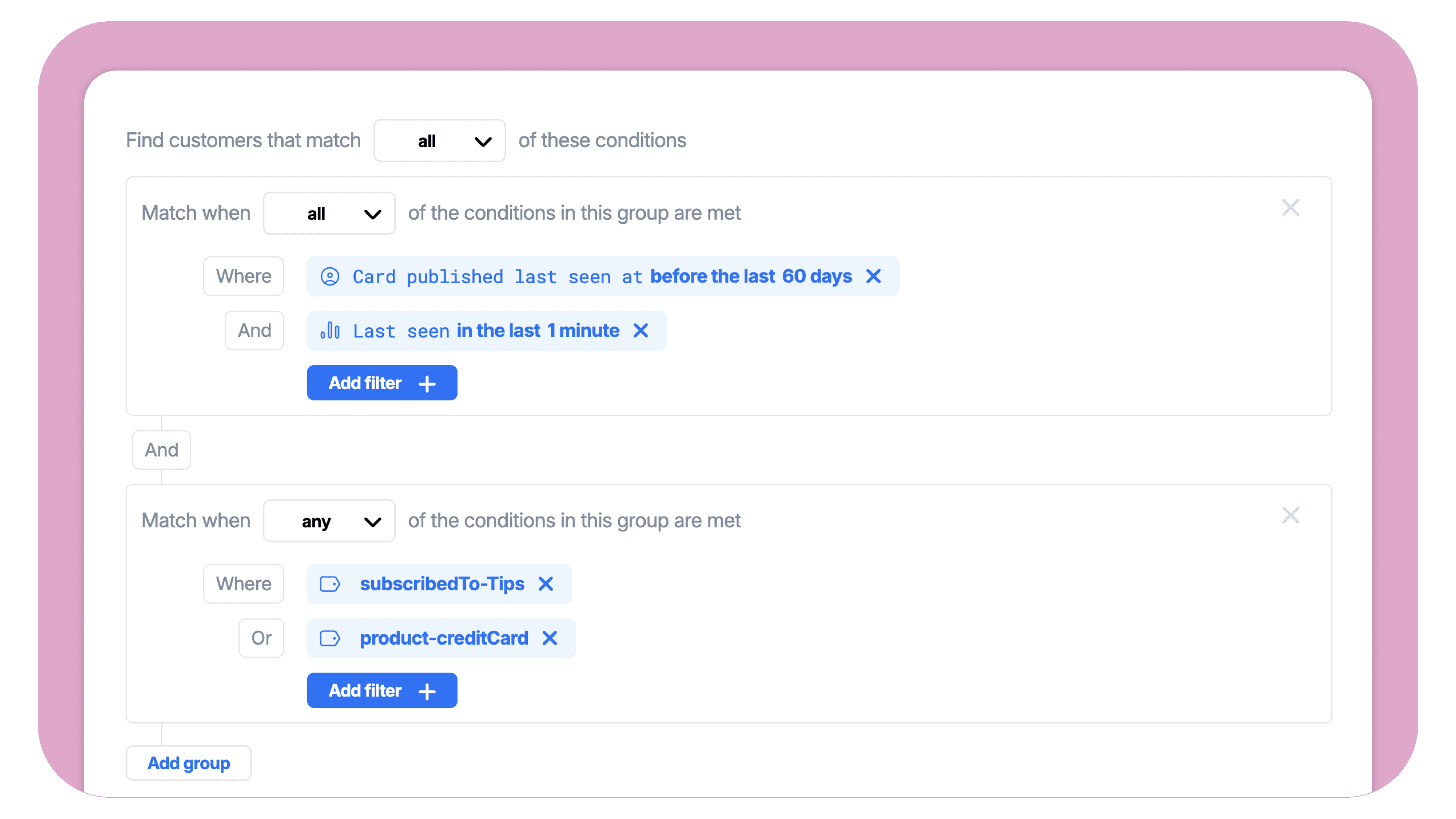
A customer is in your app right now, last seen in the last minute. That alone is the opportunity: they're attentive. The harder question is whether you actually have something worth saying to them in this moment. There are usually a few different reasons that answer might be yes:
They haven't been sent anything from you through Atomic in the last 60 days, so you have headroom without risking message fatigue.
They hold a particular product where you have a current activation prompt to surface.
They have a tag indicating they've opted into educational content, and you have a relevant lesson to offer.
Any one of those, paired with "in the app right now," is a green light. As a multi-group segment, that's three groups combined with match-any, where each group ANDs the live-presence condition with one of the contextual reasons. None of this works if the segment driving the flow only refreshes overnight; it works because the segment evaluates state and recency together, and a flow fires on entry. It's how you capture opportunities to drive action in a safe, responsive way using data that's only useful while it's still fresh.
Multi-group filters make loops like this easier to express, because the trigger conditions for them are usually a mix of state ("this customer is on iOS, in the trial cohort") and recent behaviour ("hasn't completed onboarding step 3, opened a card in the last five minutes"). That's exactly the match-all groups joined by match-any shape that used to need workarounds.
If your upstream platform already does the broad orchestration, treat Atomic's segments as the layer where the in-the-moment work happens. The two don't compete. They cover different windows of time.
One practical implication: this kind of segmentation only goes as far as the data Atomic can see. If your customer profiles in Atomic are thin today, because most of your profile data lives in your CDP, your data warehouse, or upstream platforms, this is a good moment to take stock. A small set of attributes, synced in from upstream or set from the SDK, often unlocks the bulk of these real-time use cases. Tags for product holdings and content opt-ins. A lifecycle stage. A handful of custom events that mark meaningful moments inside the app. If you're not sure what the right starting set looks like for your product, the team is happy to talk through what would give you the most leverage with the least sync work, and what's worth holding off on.
What hasn't changed
The fields you can filter on are the same. Profile fields, profile activity, custom events, tags, custom fields; the filtering reference covers the full list. Match-all and match-any still mean what they meant. Segments are still dynamic, still real-time, still update as customers' data updates.
What's changed is just the shape of logic you can express. Which, it turns out, is most of what matters.
Before you push it live
A short discipline that's worth keeping, especially as your logic gets richer:
Check the count. A small typo in the logic can move a segment by an order of magnitude. Eyeball the size before launching anything against it.
Sample a few customers and confirm they actually match the intent. Especially worth doing the first time you mix groups.
Name the segment by what it means, not by how it's built. "Re-engage: high-value or new" survives an internal handoff better than "Group A OR Group B."
Remember that editing a segment can move customers into it. Segments are dynamic, so a change to the filter logic can pull new customers in immediately. If an Action Flow is triggered on segment entry, those customers will start that flow as soon as they qualify. Before saving an edit, think through who the new definition will newly include, and whether any flow downstream of the segment is one you want them to enter right now.
Where to start
If you've been working around this constraint, and most teams of any size have been, this is one of those improvements that doesn't look dramatic on a changelog and quietly removes a category of busywork. Open a segment you've previously had to split, and see if it can collapse back into one.
If you'd like a second pair of eyes on a segment design, the team is happy to take a look.
About the author
Jo Haanstra
CEO
With a passion for driving exponential growth, Jo helps build, scale, and grow companies. Having worked with a broad range of public and private sector organisations, Jo is a widely respected and influential leader in the NZ tech landscape.



