
Global variables: shared values for every Action Flow
Define a value once for an environment and use it in any Action Flow. Change it in one place, and every Action Flow that uses it picks up the new value from its next run, without being republished.


Indy Griffiths
—
Until now, every variable belonged to a single Action Flow. That suits values that are specific to one Action Flow or one customer, such as an account balance or a payment due date.
Some values might be shared by multiple Action Flows, like an interest rate, a support phone number, the name and discount of a current sale, or the endpoint of an API that several Action Flows send requests to. Keeping these as Action Flow variables means editing, requesting approval, and republishing each Action Flow whenever the value changes.
Atomic is introducing global variables, now in beta, where you can define a value once for an environment and use it in any Action Flow. Any Action Flow that uses it automatically picks up any changes when it next runs, without the Action Flow needing to be republished.

Getting started with global variables
Global variables can be managed under Configuration > Action Flows > Global variables within the Atomic Workbench, and are available to use in an Action Flow alongside the Action Flow's own variables, including cards, branch conditions, Send Request steps, and Atomic AI steps.
Editing global variables requires administrative access to Action Flows. Anyone who can view Action Flows can view them, and anyone who can edit an Action Flow can use them in it.
Because a change can reach many Action Flows at once, global variables are built with governance in mind. Each global variable shows which Action Flows use it, and keeps an auditable history of who changed it and when, with the ability to leave a note about why the variable was changed or restore a previous version.
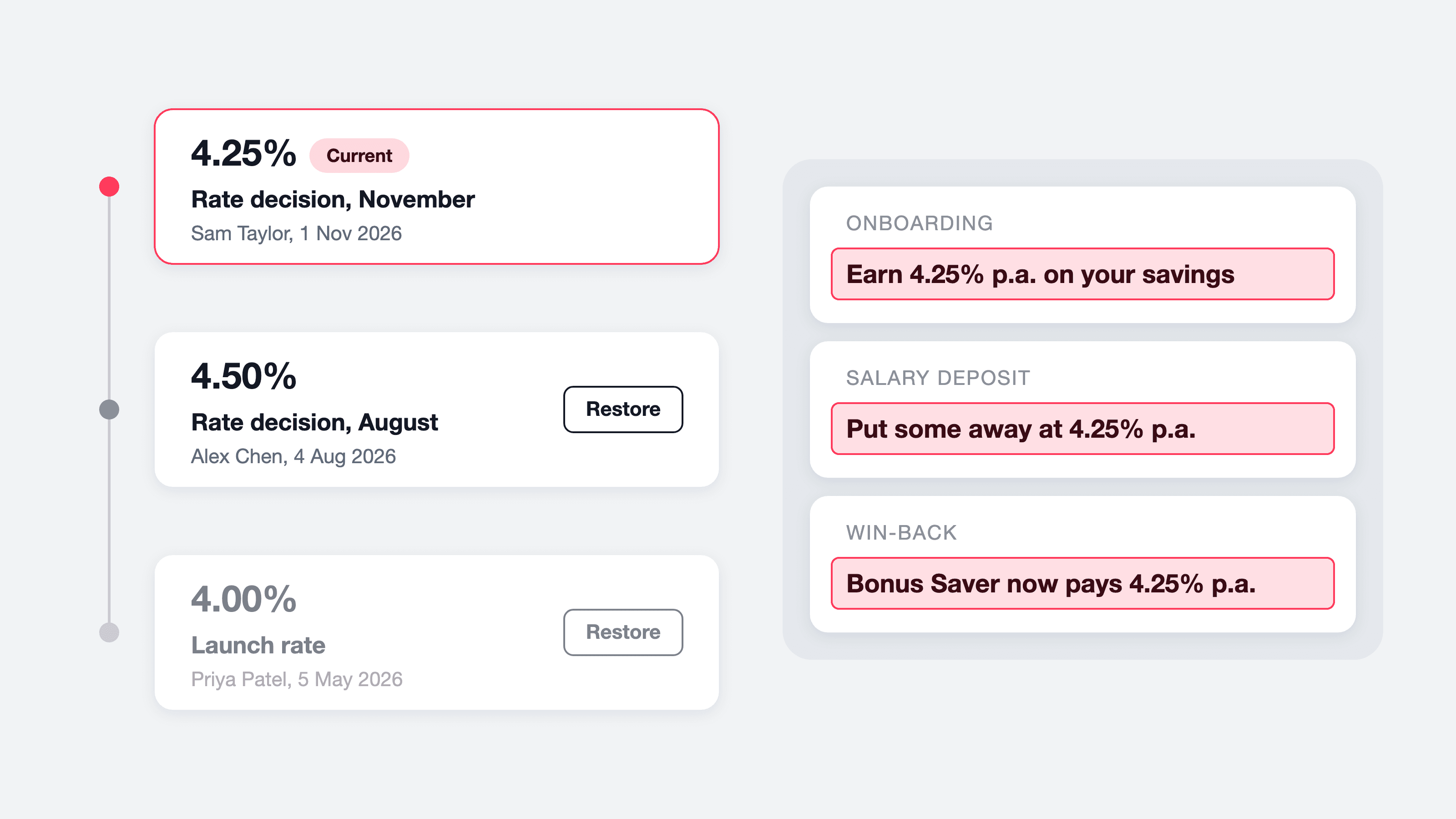
How global variables are applied
Each Action Flow run takes a copy of the global variables it uses when it starts, and keeps those values until it ends. When the Action Flow next runs after a change to the global variables, it picks up the new value automatically. An Action Flow run that is still in progress, such as one waiting for a card event, keeps the values it started with when the Action Flow run resumes.
Global variables support the same data types as Action Flow variables, and allow request overrides per Action Flow run using the API, CSV bulk sends, and the wide range of Atomic integrations including Adobe Marketo Engage, Microsoft Dynamics 365 Customer Insights, and Salesforce Marketing Cloud Journey Builder.

Each card also carries the global variable values it was sent with, so the Atomic SDKs can filter a stream container by them. For example, keeping an account identifier in a global variable that every Action Flow shares lets a single container show each account screen only the cards for that account.
Available now in beta
You can start adding global variables today from the Atomic Workbench and use them in your Action Flows. As this is a beta feature, we'd like to hear how you use global variables, so please get in touch to share any feedback, or check out the global variables documentation for more detailed information.
About the author
Indy Griffiths
Senior Engineer
Indy is a Senior Engineer at Atomic, building product features that help enterprises create more intelligent and adaptive customer experiences.



